If you're anything like me, you probably spend more time at a desk than you'd prefer. And since I'm always looking for ways to increase my overall step count without feeling like I'm constantly working out, I started on a quest to find a practical treadmill desk setup.
Along the way, I discovered not only how much I enjoyed walking while working, but also which setups worked—and didn't work—for my needs. What started as an experiment eventually became one of my favorite healthy habits because it allows me to build movement into my day instead of trying to find more time for exercise.
Before diving into the different options I've tried, I wanted to share some of the benefits I've experienced.
The Benefits of Getting Steps While Working
One of the first things I noticed was an improvement in my focus and productivity. Light walking actually helped me concentrate on tasks like answering emails, brainstorming content ideas, and writing blog posts. Instead of zoning out, the movement seemed to keep my brain engaged and my energy levels steady.
I've also found that walking while working acts like a reset button. On days when I'm stressed or feeling stuck, even 10 minutes of movement can completely change my mood. In fact, I've grown to really look forward to my "work walk" times.
Another unexpected benefit has been more consistent energy throughout the day. Even slow walking seems to help me avoid that sluggish feeling that can come from sitting for hours.
While I quickly noticed the benefits, figuring out the right setup took some trial and error. I started with the treadmill I already owned and experimented with several options before finding my favorite. I wanted to share what I've learned in case you're considering creating your own treadmill desk setup.
Option 1: Treadmill with a Tabletop Attachment

When I first started, I wanted to use the treadmill I already owned (a high-quality one I invested in for running). I bought a simple desk attachment to clip onto the treadmill.
Pros:
- A ton of space for your laptop, planner, water bottle, and more.
- Great if you already have a treadmill and don’t want to invest in a new setup.
Cons:
- As someone who’s 5’11”, the desk sat way too low, even with a laptop stand. I found myself hunched over with bad posture.
- The attachment covered so much of the treadmill belt that it was hard to get a brisk walk in, let alone run. Removing it every time I wanted to use the treadmill for running was a hassle.


But, If you’re shorter than me or have a treadmill with higher sidebars, this setup could work perfectly. It’s also a great budget option if you already own a treadmill.
Option 2: Treadmill with an Over-the-Top Attachment (Surfshelf)

After a few months of not using the tabletop attachment, I remembered seeing the Surfshelf—a compact, clip-on shelf for treadmills. I decided to give it a try, and I haven’t looked back!
Pros:
- Quick and easy to clip on and off, which makes it perfect for alternating between walking and running.
- Feels very secure and even comes with a safety strap for your laptop, so there’s no need to worry about it sliding around.
- Versatile and adjustable, making it a great option for most treadmill models.
Cons:
- Setup took a bit of trial and error, but a few YouTube videos and help from my husband made it easy.

If you want a compact, easy-to-use option that doesn’t interfere with your treadmill’s primary function, this is a game-changer.
Option 3: Walking Pad with a Standing Desk
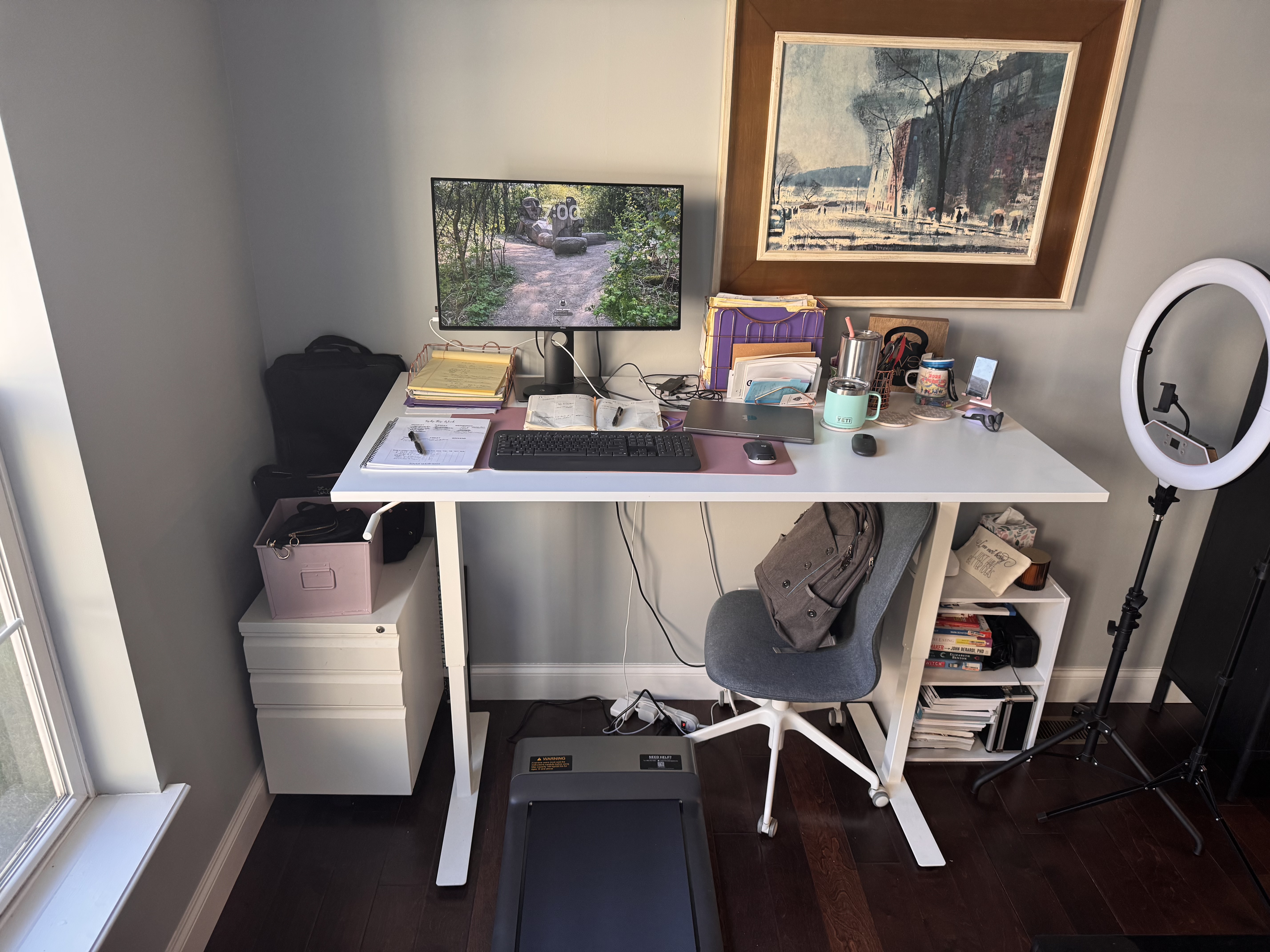
Eventually, I realized I loved walking while working so much that I decided to upgrade my setup.
I already had an IKEA desk that converts from sitting to standing (I think my exact one is discontinued, but here is a similar one, IKEA also has other options that are cheaper) so I decided to pair it with a walking pad. One of the things I was most excited about was having my entire desk available instead of just my laptop. I also liked the idea of moving my workspace out of the basement and into my office.
As someone who is 5'11", I quickly discovered that many walking pads have very short decks. Since I have a longer stride, I wanted something that folded up for storage but still had enough walking surface to be comfortable. That's what initially attracted me to the Walking Pad P1.
Unfortunately, while I absolutely love the concept of a walking pad, I can't honestly recommend the Walking Pad brand.
I've already gone through two units because of various issues. To their credit, the company refunded all of my money, which I appreciate. However, the replacement unit started giving me problems within two weeks. Having spent years operating a gym, I have a basic understanding of equipment maintenance, and I can tell you this machine is not easy to work on with about 20 tiny screws needing to be removed to get to the motor. Troubleshooting is far from straightforward.
I'm still using the second machine because it works well enough for now, but I wouldn't feel comfortable recommending it based on my experience.
I also purchased another walking pad from Amazon that my husband now uses in his office. So far, it has held up well, although he only works from home two days a week and tends to use it for short periods between tasks. In comparison, I often spend 30 minute to 1 hour stretches walking while I work, so my walking pad sees significantly heavier use.
Despite the frustrations with the machine itself, this setup has become my favorite.
Having my entire desk available instead of just my laptop has been a huge upgrade. I love being able to spread out my planner, keep my to-do list visible, and have everything I need within reach. Another unexpected benefit has been using an external monitor. Before this setup, I had never connected my laptop to a larger screen, and I really enjoy that little luxury.
Another improvement is the environment itself. My previous treadmill setups were in the basement, while my desk now sits right next to a window. I absolutely love working with natural light, and having a brighter, more inviting workspace has made this setup much more enjoyable.
Pros
- Full desk space for planners, notes, and paperwork.
- Ability to use an external monitor..
- Bright workspace with natural light.
- My favorite setup overall.
Cons
- Most expensive option.
- Walking pad quality varies greatly.
- Many walking pads have short decks.
- Heavy users may experience durability issues.
- I personally cannot recommend the Walking Pad P1 based on my experience.
Tips for Getting Started
Once you’ve found the right setup, it’s important to ease into walking while working. I’ve learned through trial and error that starting slow—both in speed and duration—makes all the difference.
- Start Slow: Walk way slower than you think. I started at 2.0 mph, which was perfect for typing and answering emails without feeling off balance.
- Ease into It: Start with just 10-15 minutes and gradually increase your time as you get used to it. Trying to walk for an hour right away can lead to burnout. I’ve had a lot of clients jump right in and stop using the set up over time because they burnt out too quickly.
- Simplify Tasks: Start with tasks that don’t require intense focus, like answering emails, attending virtual meetings (camera off), or brainstorming ideas. Writing content, like this blog, is my go-to activity while walking.
- Use Voice-to-Text: If you want to pick up the pace but still get work done, voice-to-text is a lifesaver. It may take some time for your device to adjust to your voice, but the more you use it, the more accurate it becomes.
- Don’t Stress About Missed Steps: Many fitness trackers rely on arm movement to count steps, so typing at your desk might not register everything. Some people wear their watch on their ankle or what I have been doing is putting my watch in my pocket. But even if you don't, remember you are moving and it counts!
Looking back, what started as a way to increase my step count turned into one of my favorite healthy habits. I love that walking while working allows me to build movement into my day instead of trying to find more time for exercise.
And that's really what I've learned through all three setups. You don't need the perfect equipment or the fanciest workspace. You just need something that fits your life well enough that you'll actually use it.
Because the best healthy habits are often the ones that become part of your everyday routine without requiring a lot of extra time or thought.